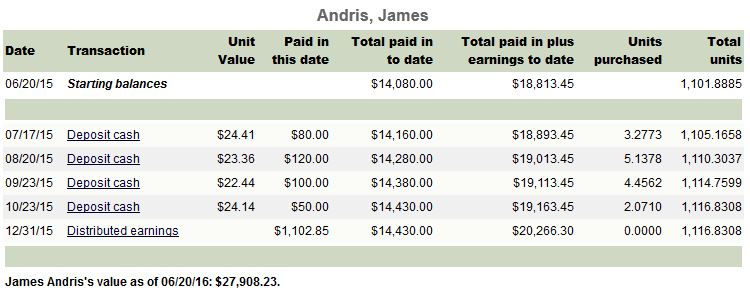
The Member Unit Ledger lists all member transactions between specified dates. The report also shows the starting balances for the club members as of the report’s starting date.
Use this report to reconcile member records, or to provide a member with his or her personal record.
Member Unit Ledger Report Options
You can specify the starting and ending date for the report, and you can specify the members whose transactions are included in the report. The options are available at the bottom of the report page in a box labeled “Show ledger entries.”
Enter the starting and ending dates for the report in the “from” and “to” boxes.
Use the drop down list to select the members included in the report. The default is “All Members.” By clicking on the drop down list, you can select the members. Choices include “All Members,” “Current Members,” and “Former Members.” You can also select an individual member of the club. An asterisk identifies Inactive members. Click “Submit” to generate the report with the new selections.
Member Unit Ledger Report Description
Date – date of the transaction
Transaction – type of transaction. Click on the entry to view or edit the transaction.
Deposit Cash - a regular member deposit, that buys units in the club
Member Fee - a deposit that does *not* buy units in the club; most often used if the member is paying the club back
Expense - This only shows up if the expense was allocated equally among all members; allocating this way subtracts units from all members
Withdrawal announced/valued - If a withdrawal is started on one date, and has a payment on a different date, this entry shows the start date of the withdrawal.
Withdrawal Paid - If a withdrawal is started on one date, and has a payment on a different date, this entry shows the date that money or shares were removed.
Withdrawal - If the annoucnement and payout date are the same - the system makes this entry instead of the separate Withdrawal announced/valued and Withdrawal Paid entries.
WD Distrib earnings - This shows the member's share of gains or losses in the club, at the time of withdrawal. The Paid in this date refelects the total of the member's share of gains and loasses in the club up to that date, and the Total paid in plus earnings will increase or decrease by that amount, to show the change in the member's basis before the cash and/or stock values are applied to the member's basis in the club.
Distributed Earnings - This shows a single figure totaling up the member's share of the club's gains/losses for the year. As a single figure, this may not be too useful; check the Allocation of Income and Expense report for more detailed information.
BBal Member / BBal Earnings - These are adjusting entries, meant to be used if a club switched from a different service, or if member records need to be adjusted. The BBal Member entry usually includes a number of units added to reflect member deposits or withdrawals, while the BBal Earnings usually just adds or subtracts the total in the Paid In Plus earnings column.
Unit Value - Shows the unit value that was used to calculate how many units were added or subtracted for deposits, withdrawals and expenses.
Paid in this date – amount of the transaction
Total paid in to date – Total payments and fees minus withdrawals paid as of the report date. Distributions are not included
Paid in plus earnings to date – total paid in to date plus distributed earnings. This figure is the member’s tax basis for in the club
Units purchased – number of units associated with the transaction
Total units - total units to the date of each transaction